

 Graham Murray
What is SkiaSharp?
Tools like Xamarin help you, at least, use a common programming language across all important platforms, but while that’s great for helping you share the business logic for your application, it doesn’t automatically make it easy to share UI logic.
Xamarin/Microsoft provide multiple tools to help share your UI implementation across different platforms. They created Xamarin.Forms to help you abstractly define UI views for your application once, and then reuse them across supported platforms. Xamarin.Forms is very cool, at least we think so, which is why we have a new product available to make sure you can do even more awesome things with Xamarin.Forms. But what if there’s still something that Forms can’t do, but you still need? Wouldn’t it be great to render custom graphics across platforms in C#?
Well, I wanted to do just this, a few years ago, but the challenge was that there was no cross platform C# 2D API available across all important platforms at the time. So, I created an abstraction around the various native 2D rendering APIs to let me write some rendering logic once, and have some abstraction layers convert it to the correct sequence of calls to the various native rendering APIs. What I found, though, is that there winds up being lots of interesting overhead using this path. My logic would build some 2D graphics primitives in C# that would then need to be represented, on Android, as Java objects, and then those Java objects would need to be represented as native classes down in the native rendering layer of Android, and so on and so forth for each platform. Having this many layers of abstraction was causing some not insignificant overhead when combined with the chattiness that you have using a 2D rendering API and complex 2D graphics.
Well, Xamarin themselves must felt this same pain, because it lead them to create SkiaSharp. SkiaSharp is a cross platform 2D graphics rendering API which you can use across a host of different platforms, including Android/iOS platforms via Xamarin. SkiaSharp is some C# bindings directly around the C native API for the Skia rendering library. Skia is a fast, open source rendering library that is heavily used in Android and the Chrome browser and numerous other high profile projects. With SkiaSharp in hand, you can do fast 2D graphics rendering across lots of platforms with comparatively little overhead in your interaction with the API since the C# API is able to talk directly to the Skia native library. In this article, I’ll lead you through how you can get started with the API.
Getting Started
To start with, open Visual Studio and create a new cross platform project. This is one of the templates that Xamarin installs into Visual Studio.
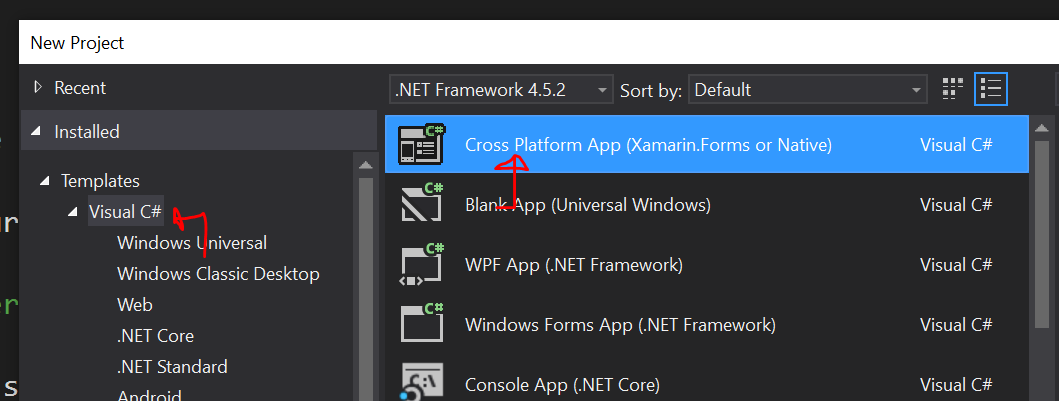
This can be made to be a Xamarin.Forms app, or a native app, depending on your preference. I just created a native app for the purposes of this demo, sharing code via a PCL (portable class library), rather than a shared project. This will create a host of default platforms associated with the template, and you can add additional projects, provided they also support SkiaSharp, as desired.
When I selected a native cross platform app, it created a PCL project to share code between platforms, a Xamarin.Android project, and a Xamarin.iOS project, but I then proceeded to also add a WPF project and a UWP project into the mix, since both of these platforms also support SkiaSharp for rendering. I then added references to the PCL project to the two new projects I added to the solution.
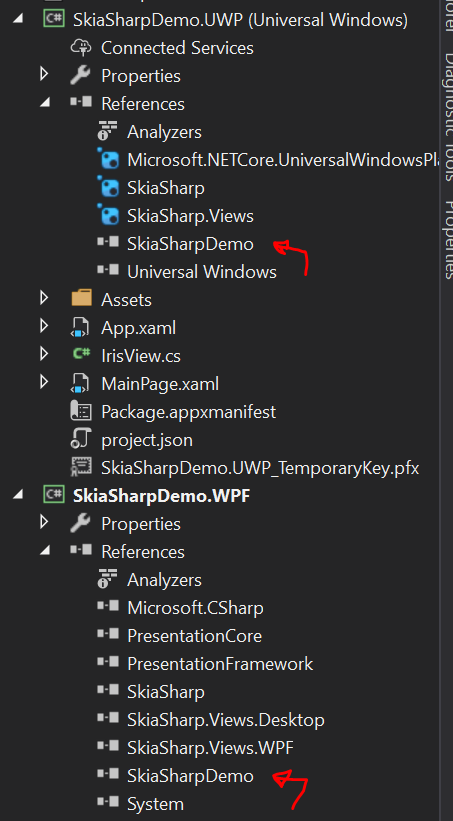
Next, you need to add some NuGet packages to the solution. If you right click on the solution node and select “Manage Nuget Packages for the Solution” you should then be able to search online for and install SkiaSharp and SkiaSharp.Views into all projects in the solution. SkiaSharp.Views has some helper classes that help you bootstrap the rendering of SkiaSharp into a native UI view on your platform of choice, saving you some boilerplate logic. SkiaSharp.Views should be installed for all projects except for the PCL, which it provides no utility to (as it isn’t bound to a particular UI platform).
Our Goal
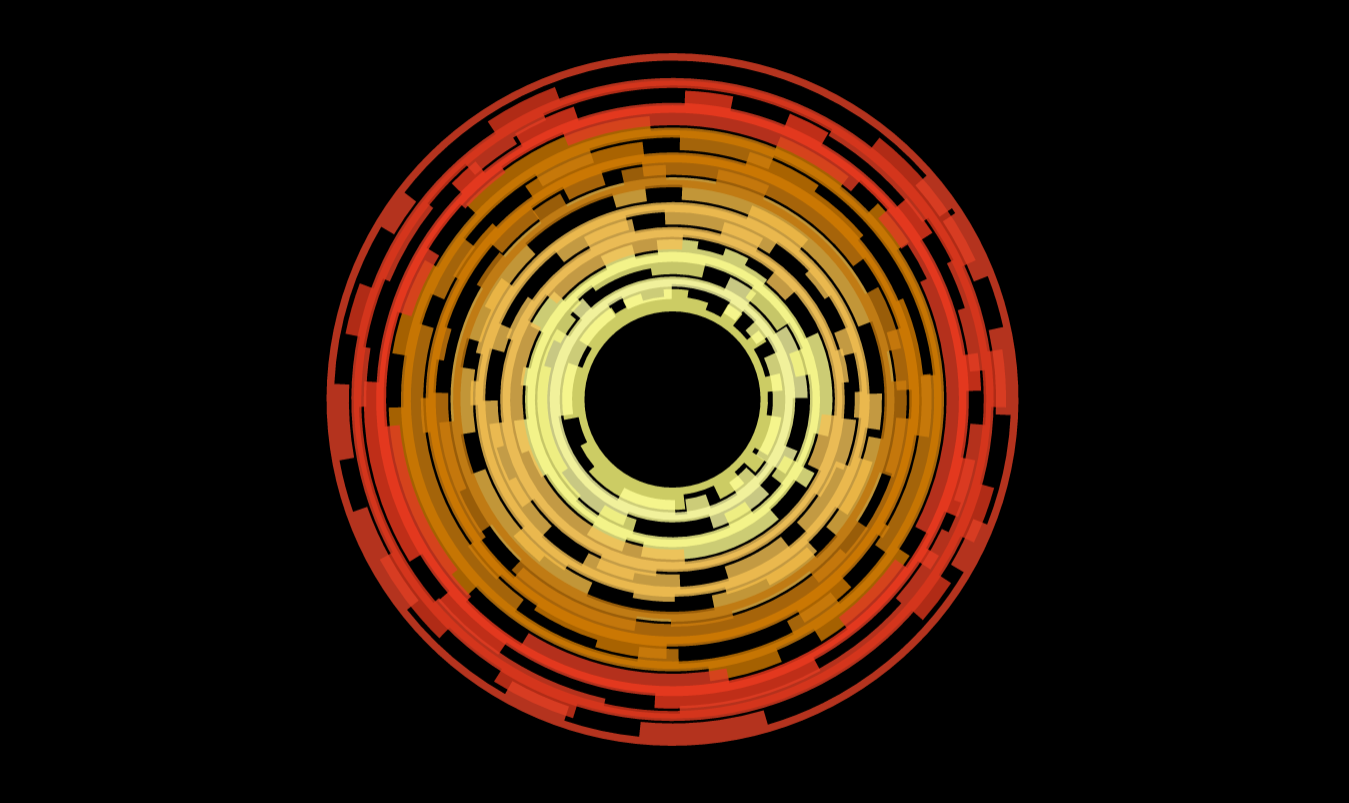
We’ll start with something simple, by rendering a simple circle, but then we’ll move onto something considerably more complicated. One of our older samples browsers had a neat animated iris effect:

Which was performed, I gather, by overlaying a bunch of images and then rotating them in different directions. In that case the images were static, but I was curious if you could, alternatively, simply put all the logic into a view and render it all dynamically. Let’s move toward that goal.
We’ll start by leveraging SkiaSharp.Views to create a component called IrisView for Android. We’ll later extend this further and then fill out the details for the other platforms.
using System;
using System.Collections.Generic;
using System.Linq;
using System.Text;

using Android.App;
using Android.Content;
using Android.OS;
using Android.Runtime;
using Android.Views;
using Android.Widget;
using SkiaSharp;
using Android.Util;

namespace SkiaSharpDemo.Droid
{
    public class IrisView
        : SkiaSharp.Views.Android.SKCanvasView
    {
        private Handler _handler;

        private void Initialize()
        {
            _handler = new Handler(Context.MainLooper);
        }

        public IrisView(Context context)
            : base(context)
        {
            Initialize();
        }

        public IrisView(Context context, IAttributeSet attrs)
            : base(context, attrs)
        {
            Initialize();
        }
        public IrisView(Context context, IAttributeSet attrs, int defStyleAttr)
            : base(context, attrs)
        {
            Initialize();
        }
        protected IrisView(IntPtr javaReference, JniHandleOwnership transfer)
            : base(javaReference, transfer)
        {
            Initialize();
        }

        protected override void OnDraw(SKSurface surface, SKImageInfo info)
        {
            base.OnDraw(surface, info);

            //Get the canvas from the skia surface.
            var context = surface.Canvas;

            //Clear out the current content for the canvas.
            context.DrawColor(SKColors.Transparent, SKBlendMode.Clear);

            //Determine the center for the circle.
            var centerX = info.Width / 2.0f;
            var centerY = info.Height / 2.0f;

            //Determine the radius for the circle.
            var rad = Math.Min(info.Width, info.Height) / 2.0f;

            //Create the paint object to fill the circle.
            using (SKPaint p = new SKPaint())
            {
                p.IsStroke = false;
                p.IsAntialias = true;
                p.Color = new SKColor(255, 0, 0);
                //Fill the circle.
                context.DrawCircle(centerX, centerY, rad, p);
            };
        }
    }
}
Most of this code is boilerplate logic to extend one of the views that SkiaSharp.Views provides to be able to render content using SkiaSharp within a normal Android view. If we focus on the logic that does the painting:
//Get the canvas from the skia surface.
var context = surface.Canvas;

//Clear out the current content for the canvas.
context.DrawColor(SKColors.Transparent, SKBlendMode.Clear);

//Determine the center for the circle.
var centerX = info.Width / 2.0f;
var centerY = info.Height / 2.0f;

//Determine the radius for the circle.
var rad = Math.Min(info.Width, info.Height) / 2.0f;

//Create the paint object to fill the circle.
using (SKPaint p = new SKPaint())
{
    p.IsStroke = false;
    p.IsAntialias = true;
    p.Color = new SKColor(255, 0, 0);
    //Fill the circle.
    context.DrawCircle(centerX, centerY, rad, p);
};
Here we:
- Obtain the Skia Canvas to paint into.
- Clear the initial color displayed in the canvas (wiping away any prior rendering).
- Determine the center of the view and the radius of a circle we can draw into it.
- Create a Skia Paint object that will fill with red, using anti-aliasing.
- Draw the circle into the canvas using the configured paint object.
Then, back in our main activity, if you add this IrisView to the layout, you should see something like this:
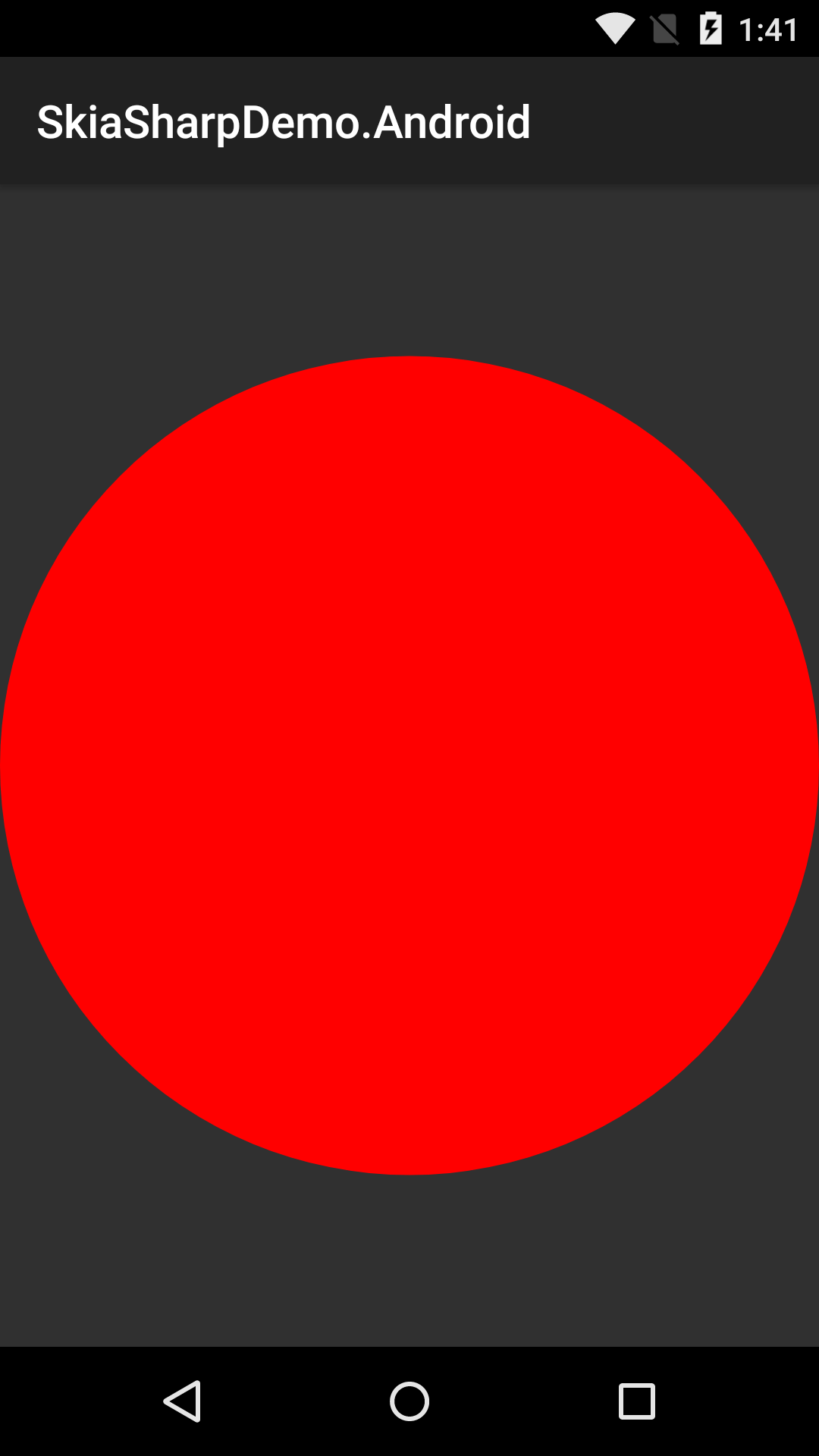
Ok, this is neat, but, obviously, if the rendering logic is in the native Android view, we can’t share it between platforms, right? So let’s refactor this a bit. Up in the PCL, we create a class called IrisRenderer.cs with this content:
using SkiaSharp;
using System;
using System.Collections.Generic;

namespace SkiaSharpDemo
{
    public class IrisRenderer
    {
        public IrisRenderer()
        {

        }

        private DateTime _lastRender = DateTime.Now;
        private bool _forward = true;
        private double _progress = 0;
        private double _duration = 5000;
        private Random _rand = new Random();

        private static double Cubic(double p)
        {
            return p * p * p;
        }

        public static double CubicEase(double t)
        {
            if (t < .5)
            {
                var fastTime = t * 2.0;
                return .5 * Cubic(fastTime);
            }

            var outFastTime = (1.0 - t) * 2.0;
            var y = 1.0 - Cubic(outFastTime);
            return .5 * y + .5;
        }

        private bool _first = true;
        public void RenderIris(SKSurface surface, SKImageInfo info)
        {
            if (_first)
            {
                _first = false;
                _lastRender = DateTime.Now;
            }
            var currTime = DateTime.Now;
            var elapsed = (currTime - _lastRender).TotalMilliseconds;

            _lastRender = currTime;

            if (_forward)
            {
                _progress += elapsed / _duration;
            }
            else
            {
                _progress -= elapsed / _duration;
            }
            if (_progress > 1.0)
            {
                _progress = 1.0;
                _forward = false;
                _duration = 1000 + 4000 * _rand.NextDouble();
            }
            if (_progress < 0)
            {
                _progress = 0;
                _forward = true;
                _duration = 1000 + 4000 * _rand.NextDouble();
            }

            var context = surface.Canvas;
            context.DrawColor(SKColors.Transparent, SKBlendMode.Clear);

            //Determine the center for the circle.
            var centerX = info.Width / 2.0f;
            var centerY = info.Height / 2.0f;

            //Determine the radius for the circle.
            var rad = Math.Min(info.Width, info.Height) / 2.0f;

            var fromR = 255;
            var fromG = 0;
            var fromB = 0;

            var toR = 0;
            var toG = 0;
            var toB = 255;

            var actualProgress = CubicEase(_progress);
            var actualR = (byte)Math.Round(fromR + (double)(toR - fromR) * actualProgress);
            var actualG = (byte)Math.Round(fromG + (double)(toG - fromG) * actualProgress);
            var actualB = (byte)Math.Round(fromB + (double)(toB - fromB) * actualProgress);

            //Create the paint object to fill the circle.
            using (SKPaint p = new SKPaint())
            {
                p.IsStroke = false;
                p.IsAntialias = true;
                p.Color = new SKColor(actualR, actualG, actualB);
                //Fill the circle.
                context.DrawCircle(centerX, centerY, rad, p);
            };
        }
    }
}
And we amend the IrisView for Android to look like this:
using System;
using System.Collections.Generic;
using System.Linq;
using System.Text;

using Android.App;
using Android.Content;
using Android.OS;
using Android.Runtime;
using Android.Views;
using Android.Widget;
using SkiaSharp;
using Android.Util;

namespace SkiaSharpDemo.Droid
{
    public class IrisView
        : SkiaSharp.Views.Android.SKCanvasView
    {
        private IrisRenderer _irisRenderer;
        private Handler _handler;

        private void Initialize()
        {
            //The IrisRenderer will perform the actual rendering logic for this view.
            _irisRenderer = new IrisRenderer();
            _handler = new Handler(Context.MainLooper);
            //This starts a tick loop that we will use later for animation.
            _handler.Post(Tick);
        }

        private DateTime _lastTime = DateTime.Now;
        private void Tick()
        {
            DateTime currTime = DateTime.Now;
            //Don't render new frames too often.
            if (currTime - _lastTime < TimeSpan.FromMilliseconds(16))
            {
                _handler.Post(Tick);
                return;
            }
            _lastTime = currTime;
            Invalidate();
            _handler.Post(Tick);
        }

        public IrisView(Context context)
            : base(context)
        {
            Initialize();
        }

        public IrisView(Context context, IAttributeSet attrs)
            : base(context, attrs)
        {
            Initialize();
        }
        public IrisView(Context context, IAttributeSet attrs, int defStyleAttr)
            : base(context, attrs)
        {
            Initialize();
        }
        protected IrisView(IntPtr javaReference, JniHandleOwnership transfer)
            : base(javaReference, transfer)
        {
            Initialize();
        }

        protected override void OnDraw(SKSurface surface, SKImageInfo info)
        {
            base.OnDraw(surface, info);

            _irisRenderer.RenderIris(surface, info);
        }
    }
}
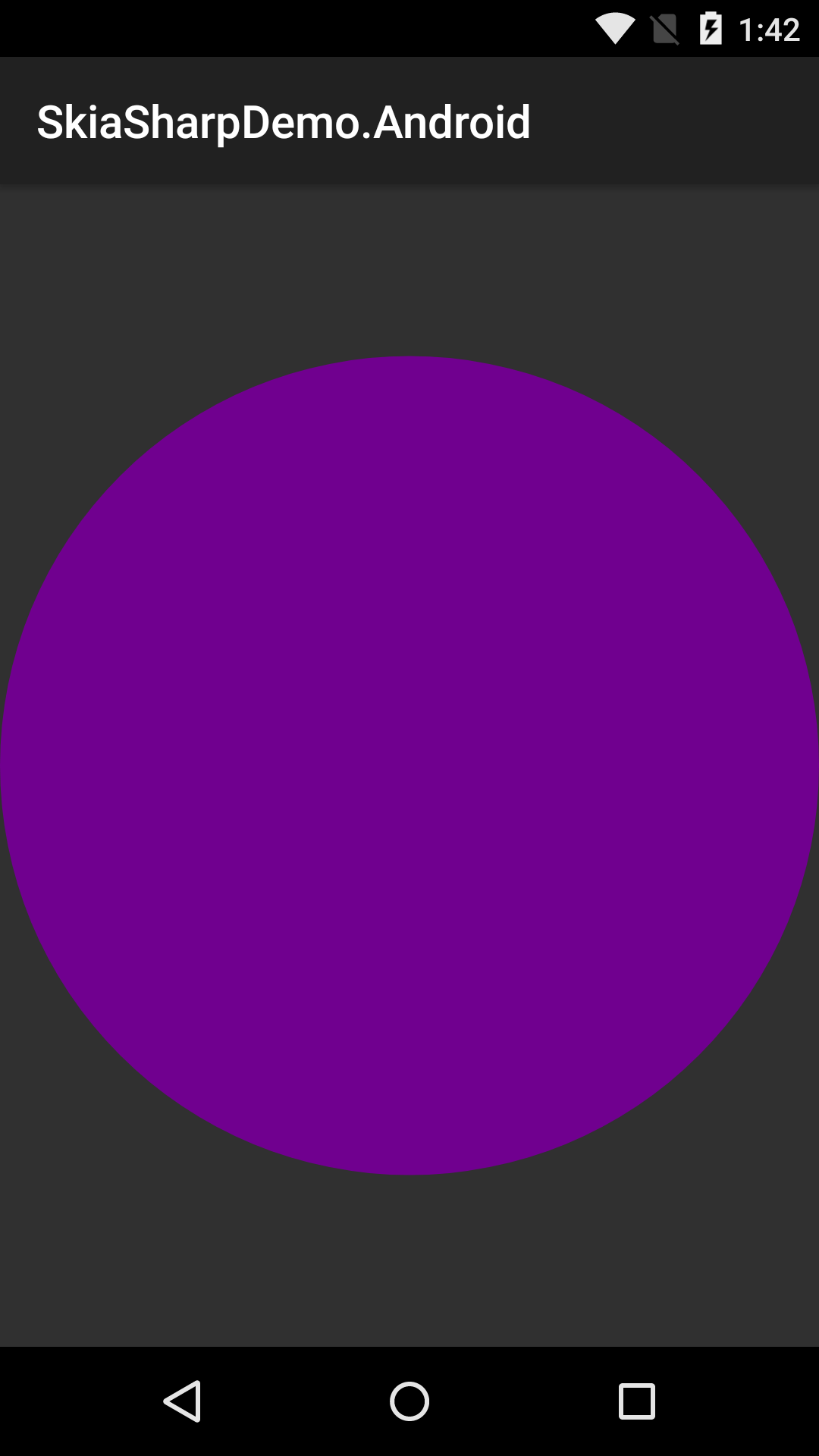
In this way, we’ve factored all of the rendering logic into a shared class that sits in the PCL, which can be shared between all the platforms we want to target. We only need to code it once and it’s done. Additionally, we’ve added a primitive animation system which will keep invalidating the view and repainting on an interval so that our renderer can analyze the elapsed time and animate changes using linear interpolation (eased with a cubic easing function). Pretty cool, huh? Here’s what the circle looks like during an animation between blue and red:
Ok, at this point, we can fill out the rest of the implementations for IrisView. These need to be separate classes because each platform has different requirements in terms as to what constitutes a UI view, and different mechanisms that we can use to drive the animation loop, but the idea is to minimize the content of these classes to contain only platform specific behaviors. We also have the option of building additional abstractions (for example, one around animation) that would further reduce the logic in these classes. Here’s the version of the view for iOS:
using System;
using System.Collections.Generic;
using System.Linq;
using System.Text;

using Foundation;
using SkiaSharp;
using UIKit;
using CoreGraphics;
using CoreFoundation;

namespace SkiaSharpDemo.iOS
{
    public class IrisView
        : SkiaSharp.Views.iOS.SKCanvasView
    {
        private IrisRenderer _irisRenderer;

        public IrisView()
            : base()
        {
            Initialize();
        }
        public IrisView(CGRect frame)
            : base(frame)
        {
            Initialize();
        }
        public IrisView(IntPtr p)
            : base(p)
        {
            Initialize();
        }

        private void Initialize()
        {

            BackgroundColor = UIColor.Clear;
            _irisRenderer = new IrisRenderer();
            DispatchQueue.MainQueue.DispatchAsync(Tick);
        }

        private DateTime _lastTime = DateTime.Now;
        private void Tick()
        {
            DateTime currTime = DateTime.Now;
            if (currTime - _lastTime < TimeSpan.FromMilliseconds(16))
            {
                DispatchQueue.MainQueue.DispatchAsync(Tick);
                return;
            }
            _lastTime = currTime;
            SetNeedsDisplay();
            DispatchQueue.MainQueue.DispatchAsync(Tick);
        }

        public override void DrawInSurface(SKSurface surface, SKImageInfo info)
        {
            base.DrawInSurface(surface, info);

            var ctx = UIGraphics.GetCurrentContext();
            ctx.ClearRect(Bounds);

            _irisRenderer.RenderIris(surface, info);
        }
    }
}
And WPF:
using System;
using System.Collections.Generic;
using System.Linq;
using System.Text;
using System.Threading.Tasks;
using System.Windows;
using SkiaSharp.Views.Desktop;

namespace SkiaSharpDemo.WPF
{
    public class IrisView
        : SkiaSharp.Views.WPF.SKElement
    {
        private IrisRenderer _irisRenderer;

        public IrisView()
        {
            Initialize();
        }

        private void Initialize()
        {
            _irisRenderer = new IrisRenderer();
            Task.Delay(8).ContinueWith((t) => Dispatcher.BeginInvoke(System.Windows.Threading.DispatcherPriority.Normal, (Action)Tick));
        }


        private DateTime _lastTime = DateTime.Now;
        private void Tick()
        {
            DateTime currTime = DateTime.Now;
            if (currTime - _lastTime < TimeSpan.FromMilliseconds(16))
            {
                Task.Delay(8).ContinueWith((t) => Dispatcher.BeginInvoke(System.Windows.Threading.DispatcherPriority.Normal, (Action)Tick));
                return;
            }
            _lastTime = currTime;
            InvalidateVisual();
            Task.Delay(8).ContinueWith((t) => Dispatcher.BeginInvoke(System.Windows.Threading.DispatcherPriority.Normal, (Action)Tick));
        }

        protected override void OnPaintSurface(SKPaintSurfaceEventArgs e)
        {
            base.OnPaintSurface(e);

            _irisRenderer.RenderIris(e.Surface, e.Info);
        }
    }
}
And UWP:
using System;
using System.Collections.Generic;
using System.Linq;
using System.Text;
using System.Threading.Tasks;
using System.Windows;
using Windows.UI.Core;
using SkiaSharp.Views.UWP;

namespace SkiaSharpDemo.UWP
{
    public class IrisView
        : SkiaSharp.Views.UWP.SKXamlCanvas
    {
        private IrisRenderer _irisRenderer;

        public IrisView()
        {
            Initialize();
        }

        private void Initialize()
        {
            _irisRenderer = new IrisRenderer();
            Task.Delay(8).ContinueWith((t) => Dispatcher.RunAsync(CoreDispatcherPriority.Normal, Tick));
        }


        private DateTime _lastTime = DateTime.Now;
        private void Tick()
        {
            DateTime currTime = DateTime.Now;
            if (currTime - _lastTime < TimeSpan.FromMilliseconds(16))
            {
                Task.Delay(8).ContinueWith((t) => Dispatcher.RunAsync(CoreDispatcherPriority.Normal, Tick));
                return;
            }
            _lastTime = currTime;
            Invalidate();
            Task.Delay(8).ContinueWith((t) => Dispatcher.RunAsync(CoreDispatcherPriority.Normal, Tick));
        }

        protected override void OnPaintSurface(SKPaintSurfaceEventArgs e)
        {
            base.OnPaintSurface(e);

            _irisRenderer.RenderIris(e.Surface, e.Info);
        }
    }
}
Now, we can run each of these and observe the exact same rendering behavior! If you don’t yet grasp why this is so awesome, let’s make things considerably more complicated, shall we? Update yourIrisRenderer with this content:
using SkiaSharp;
using System;
using System.Collections.Generic;

namespace SkiaSharpDemo
{
    public class IrisArc
    {
        public float CenterX { get; set; }
        public float CenterY { get; set; }
        public bool AreCogsOutward { get; set; }
        public int NumLevels { get; set; }
        public float BaseHue { get; set; }
        public float BaseLightness { get; set; }
        public float BaseSaturation { get; set; }
        public float Radius { get; set; }
        public float Span { get; set; }
        public List<Tuple<float, int>> Shape { get; set; }
        public float MinTransitionLength { get; set; }
        public float MaxTransitionLength { get; set; }
        public float RotationAngle { get; set; }
        public float Opacity { get; set; }
        public bool IsClockwise { get; internal set; }

        public IrisArc()
        {
            CenterX = .5f;
            CenterY = .5f;
            AreCogsOutward = true;
            NumLevels = 3;
            BaseHue = 220;
            BaseLightness = 50;
            BaseSaturation = 50;
            Radius = .75f;
            Span = .2f;
            Shape = new List<Tuple<float, int>>();
            MinTransitionLength = 6;
            MaxTransitionLength = 10;
            RotationAngle = 0;
            Opacity = .8f;
            GenerateShape();
        }

        private static Random _rand = new Random();

        private void GenerateShape()
        {
            float currentAngle = 0.0f;
            int currentLevel = 1 + (int)Math.Round(_rand.NextDouble() * this.NumLevels);
            float degreeChange = 0.0f;

            while (currentAngle <= 360)
            {
                AddToShape(currentAngle, currentLevel);
                if (currentAngle >= 360)
                {
                    break;
                }
                degreeChange = (float)Math.Round(MinTransitionLength + _rand.NextDouble() *
                    MaxTransitionLength);

                if (currentAngle + degreeChange > 360)
                {
                    degreeChange = 360 - currentAngle;
                }

                currentAngle = currentAngle + degreeChange;
            }
        }
        private void AddToShape(float currentAngle, int currentLevel)
        {
            bool isUp = true;
            int changeAmount;
            int maxLevels = NumLevels + 1;

            if (currentLevel == maxLevels)
            {
                isUp = false;
            }
            else
            {
                if (_rand.NextDouble() > .5)
                {
                    isUp = false;
                }
            }

            if (isUp)
            {
                changeAmount = (int)Math.Round(1.0 + _rand.NextDouble() * (maxLevels - currentLevel));
                currentLevel = currentLevel + changeAmount;

                if (currentLevel > this.NumLevels)
                {
                    currentLevel = this.NumLevels;
                }
            }
            else
            {
                changeAmount = (int)Math.Round(1.0 + _rand.NextDouble() * (currentLevel - 1));
                currentLevel = currentLevel - changeAmount;

                if (currentLevel < 1)
                {
                    currentLevel = 1;
                }
            }

            this.Shape.Add(new Tuple<float, int>(currentAngle * (float)Math.PI / 180.0f, currentLevel));
        }

        public void Render(SKSurface surface, SKImageInfo info)
        {
            float centerX = CenterX;
            float centerY = CenterY;
            float minRadius = Radius - Span / 2.0f;
            float maxRadius = Radius + Span / 2.0f;

            var context = surface.Canvas;
            centerX = info.Width * centerX;
            centerY = info.Height * centerY;

            float rad = (float)Math.Min(info.Width, info.Height) / 2.0f;

            minRadius = minRadius * rad;
            maxRadius = maxRadius * rad;

            List<float> radii = new List<float>();
            List<float> oldRadii;
            Tuple<float, int> currentItem;
            float lastAngle;
            float angleDelta;
            int currentRadius;
            float currentAngle;

            for (var i = 0; i < NumLevels + 1; i++)
            {
                radii.Add(minRadius + (maxRadius - minRadius) * i / (NumLevels));
            }
            if (!AreCogsOutward)
            {
                oldRadii = radii;
                radii = new List<float>();
                for (var j = oldRadii.Count - 1; j >= 0; j--)
                {
                    radii.Add(oldRadii[j]);
                }
            }


            context.Save();
            context.Translate(centerX, centerY);
            context.RotateDegrees(RotationAngle);
            context.Translate(-centerX, -centerY);

            SKPath path = new SKPath();
            SKColor c = SKColor.FromHsl(
                BaseHue,
                BaseSaturation,
                BaseLightness,
                (byte)Math.Round(Opacity * 255.0));
            SKPaint p = new SKPaint();
            p.IsAntialias = true;
            p.IsStroke = false;
            p.Color = c;


            if (!AreCogsOutward)
            {
                path.MoveTo(radii[0] + centerX, 0 + centerY);

                SKRect r = new SKRect(centerX - radii[0], centerY - radii[0], centerX + radii[0], centerY + radii[0]);

                path.ArcTo(r, 360, -180, false);
                path.ArcTo(r, 180, -180, false);
                path.Close();
            }

            currentRadius = this.Shape[0].Item2;
            lastAngle = 0;
            path.MoveTo(radii[currentRadius] + centerX, 0 + centerY);
            for (var i = 1; i < this.Shape.Count; i++)
            {
                currentItem = this.Shape[i];
                currentAngle = currentItem.Item1;
                currentRadius = currentItem.Item2;

                angleDelta = currentAngle - lastAngle;

                path.LineTo(
                    (float)(centerX + radii[currentRadius] * Math.Cos(lastAngle)),
                    (float)(centerY + radii[currentRadius] * Math.Sin(lastAngle)));

                SKRect r = new SKRect(
                    centerX - radii[currentRadius],
                    centerY - radii[currentRadius],
                    centerX + radii[currentRadius],
                    centerY + radii[currentRadius]);


                path.ArcTo(r,
                            (float)(lastAngle * 180.0 / Math.PI),
                            (float)((currentAngle - lastAngle) * 180.0 / Math.PI), false);
                lastAngle = currentAngle;
            }

            if (AreCogsOutward)
            {
                path.Close();
                path.MoveTo(radii[0] + centerX, 0 + centerY);
                SKRect r = new SKRect(centerX - radii[0], centerY - radii[0], centerX + radii[0], centerY + radii[0]);

                path.ArcTo(r, 360, -180, false);
                path.ArcTo(r, 180, -180, false);
            }
            path.Close();

            context.DrawPath(path, p);
            path.Dispose();
            p.Dispose();
            context.Restore();
        }
    }

    public class IrisRenderer
    {
        public IrisRenderer()
        {

        }

        private DateTime _lastRender = DateTime.Now;
        private bool _forward = true;
        private double _progress = 0;
        private double _duration = 5000;
        private Random _rand = new Random();

        private static double Cubic(double p)
        {
            return p * p * p;
        }

        public static double CubicEase(double t)
        {
            if (t < .5)
            {
                var fastTime = t * 2.0;
                return .5 * Cubic(fastTime);
            }

            var outFastTime = (1.0 - t) * 2.0;
            var y = 1.0 - Cubic(outFastTime);
            return .5 * y + .5;
        }

        private bool _first = true;
        public void RenderIris(SKSurface surface, SKImageInfo info)
        {
            if (_first)
            {
                _first = false;
                _lastRender = DateTime.Now;
            }
            var currTime = DateTime.Now;
            var elapsed = (currTime - _lastRender).TotalMilliseconds;

            _lastRender = currTime;

            if (_forward)
            {
                _progress += elapsed / _duration;
            }
            else
            {
                _progress -= elapsed / _duration;
            }
            if (_progress > 1.0)
            {
                _progress = 1.0;
                _forward = false;
                _duration = 1000 + 4000 * _rand.NextDouble();
            }
            if (_progress < 0)
            {
                _progress = 0;
                _forward = true;
                _duration = 1000 + 4000 * _rand.NextDouble();
            }

            var context = surface.Canvas;
            context.DrawColor(SKColors.Transparent, SKBlendMode.Clear);

            //Determine the center for the circle.
            var centerX = info.Width / 2.0f;
            var centerY = info.Height / 2.0f;

            //Determine the radius for the circle.
            var rad = Math.Min(info.Width, info.Height) / 2.0f;

            var fromR = 255;
            var fromG = 0;
            var fromB = 0;

            var toR = 0;
            var toG = 0;
            var toB = 255;

            var actualProgress = CubicEase(_progress);
            var actualR = (byte)Math.Round(fromR + (double)(toR - fromR) * actualProgress);
            var actualG = (byte)Math.Round(fromG + (double)(toG - fromG) * actualProgress);
            var actualB = (byte)Math.Round(fromB + (double)(toB - fromB) * actualProgress);

            //Create the paint object to fill the circle.
            using (SKPaint p = new SKPaint())
            {
                p.IsStroke = false;
                p.IsAntialias = true;
                p.Color = new SKColor(actualR, actualG, actualB);
                //Fill the circle.
                context.DrawCircle(centerX, centerY, rad, p);
            };
        }
    }
}
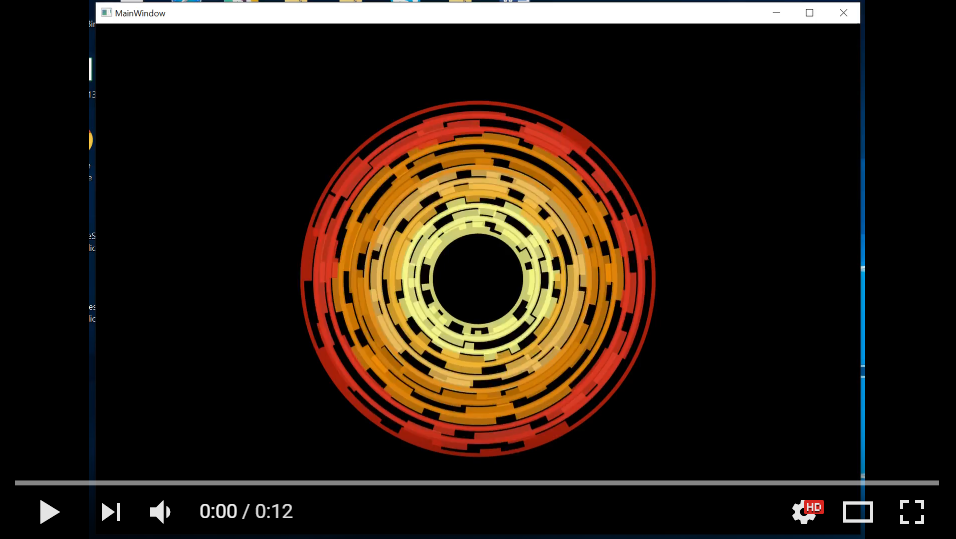
I won’t go into detail as to what is going on in this logic for this article, but if there is interest, I can break it down in a subsequent article. Still, I present this by way of showing how we can reuse a lot of complex logic across platforms. If we rerun our apps now, we should see a complex visual of intermeshing cogs counter rotating against each other:
And here’s a video of it in motion:
Now do you believe me that this is awesome? As a result, you might be thinking: “Graham, if SkiaSharp makes it so easy to do high performance rendering across platforms, wouldn’t it be neat if someone built some really awesome UI stuff that we could use in cross platform apps?”. Well, yes, actually, which is why we did exactly that:

Wrapping Up
If you have been following Infragistics + Xamarin for a while, you might know we’ve had a Xamarin based product for some time (and that we have a new version out now!). What may not be obvious, though, is that the new version of the product has been significantly re-engineered to have a totally consistent API, performance, and behavior story between all platforms for the 17.0 release. Previous versions of our Xamarin product were a thin veneer over our native Android and iOS products. This was only feasible due to the fact that our native mobile APIs were similar enough to each other. However, in terms of shooting for maximal consistency, the APIs were not quite consistent enough with each other (and for some components were entirely divergent), which made this strategy more expensive and limiting than desired. That, and while we worked untold black magic under the covers so that you could bind your .NET based data directly against our (decidedly non-.NET) native components efficiently, this stuff was monstrously complicated behind the scenes.
When SkiaSharp came along, we knew we had an opportunity to re-envision the product as a C# product “all the way down” even to the rendering layer, and to refocus the API (and underlying logic) to be as identical as possible between Xamarin.Forms, Xamarin.Android, Xamarin.iOS, and, in addition, to be extremely similar to our desktop XAML platforms. Barring the fact that desktop has some unique WPF features, we’ve universally made things extremely close, so that in lots of cases you can just paste logic between platforms with only minor or no adjustments. To top things off, when you use our new Xamarin components, you are, in most cases, running the exact same logic as you are in our popular desktop WPF products. We are very proud of the work we’ve done, and hope it delights you! Let us know!
-Graham


