

 Brian Lagunas
I was browsing the Infragistics WPF Forums the other day and ran into this question asking how to localize the descriptions of properties in the xamPropertyGrid control.
The original poster looked at other solutions including the use of attributes, but thought those solutions were overly complicated and not very straightforward. Of course my first thought was “then they’re are doing it wrong”. So I wanted to see if I could adapt my blog post about how to localize Enum descriptions in WPF to accommodate the xamPropertyGrid, but take it a little further by also localizing the DisplayName and Category as well. I mean heck, we are in a property grid with a lot of property information, why localize just the Description? Heck no, let’s localize it all!
Adding Localization Support
My first step was to use my LocalizedDescriptionAttribute “as-is” from my other post to see if it would just work. So I just copied and pasted this class into my project.
public class LocalizedDescriptionAttribute : DescriptionAttribute
{
    readonly ResourceManager _resourceManager;
    readonly string _resourceKey;

    public LocalizedDescriptionAttribute(string resourceKey, Type resourceType)
    {
        _resourceManager = new ResourceManager(resourceType);
        _resourceKey = resourceKey;
    }

    public override string Description
    {
        get
        {
            string description = _resourceManager.GetString(_resourceKey);
            return string.IsNullOrWhiteSpace(description) ? string.Format("[[{0}]]", _resourceKey) : description;
        }
    }
}
Now, I wanted to add support for the DisplayName and for the Category of the properties. So I created two other classes that used a very similar approach that I used for the LocalizedDescriptionAttribute.
The LocalizedDisplayNameAttribute looks almost identical.
public class LocalizedDisplayNameAttribute : DisplayNameAttribute
{
    readonly ResourceManager _resourceManager;
    readonly string _resourceKey;

    public LocalizedDisplayNameAttribute(string resourceKey, Type resourceType)
    {
        _resourceManager = new ResourceManager(resourceType);
        _resourceKey = resourceKey;
    }

    public override string DisplayName
    {
        get
        {
            string displayName = _resourceManager.GetString(_resourceKey);
            return string.IsNullOrWhiteSpace(displayName) ? string.Format("[[{0}]]", _resourceKey) : displayName;
        }
    }
}
But, the LocalizedCategoryAttribute has a slight modification. I had to override the GetLocalizedString method. Other than that, the logic is the same.
public class LocalizedCategoryAttribute : CategoryAttribute
{
    readonly ResourceManager _resourceManager;
    readonly string _resourceKey;

    public LocalizedCategoryAttribute(string resourceKey, Type resourceType)
    {
        _resourceManager = new ResourceManager(resourceType);
        _resourceKey = resourceKey;
    }

    protected override string GetLocalizedString(string value)
    {
        string category = _resourceManager.GetString(_resourceKey);
        return string.IsNullOrWhiteSpace(category) ? string.Format("[[{0}]]", _resourceKey) : category;
    }
}
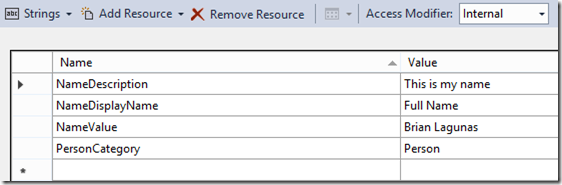
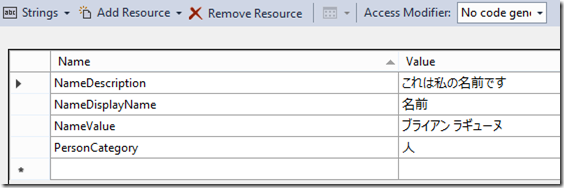
Now we can go ahead and add a couple of Resource.resx files to the project and target your desired cultures. I am supporting English and Japanese (Nihongo).
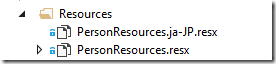
PersonResources.resx(English)
PersonResources.ja-JP.resx (Japanese)
Since we have resources, we need some properties to start localizing. I’ll keep it simple and just use a Person class with a single property.
public class Person
{
    [LocalizedDisplayName("NameDisplayName", typeof(PersonResources))]
    [LocalizedDescription("NameDescription", typeof(PersonResources))]
    [LocalizedCategory("PersonCategory", typeof(PersonResources))]
    public string Name { get; set; }
}
Let’s run our app and see what we have. The default will be our English resources. This means all of the values being displayed are being retrieved from the PersonResources.resx file.
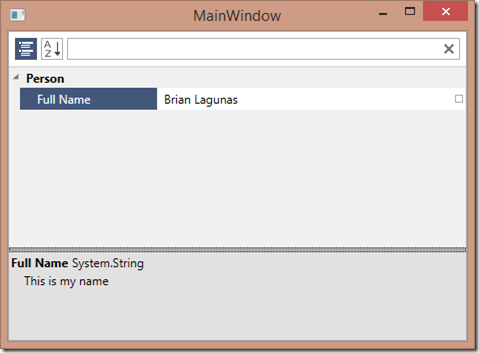
What happens when we want to change to use our Japanese localized values? Well, let’s find out. Open up your App.xaml.cs and override the startup method and change the culture.
protected override void OnStartup(StartupEventArgs e)
{
    CultureInfo info = new CultureInfo("ja-JP");
    Thread.CurrentThread.CurrentCulture = info;
    Thread.CurrentThread.CurrentUICulture = info;
}
Now, run the applications again.

Works like a charm! It is obvious that our values are being retrieved from our Japanese resources stored in the PersonResources.ja-JA.resx file.
Pretty slick, right? I don’t think this is overcomplicated or difficult to follow at all. Looks pretty straight forward to me. What do you think? Hopefully you will find this useful, and maybe even use this approach in your WPF applications. Be sure to check out the source code, and start playing with it. As always, feel free contact me on my blog, connect with me on Twitter (@brianlagunas), or leave a comment below for any questions or comments you may have.


